# Integration
lazysecrets works outside its own window too: `lazysecrets get` reads a
value for scripts, and `lazysecrets list` lists everything for fzf, editor
pickers and your own tools. Both take the [links](sharing.md) lazysecrets
copies and shares. For Neovim, there's
[lazysecrets.nvim](https://github.com/karleinarb/lazysecrets.nvim).
## Reading a value
`lazysecrets get ` prints the value, for scripts and pipes:
```sh
export DB_PASSWORD=$(lazysecrets get lazysecrets://azure/kv-app-prod.vault.azure.net/secrets/db-password)
lazysecrets get lazysecrets://azure/kv-app-prod.vault.azure.net/secrets/db-password | kubectl create secret generic db --from-file=password=/dev/stdin
```
It reads the value directly, with your az accounts (the one that last read
it first), the Databricks profile for the workspace, or sops in your clone
of the repo; a version in the link reads that version. `--account` tries
that account first, as [`list`](#listing-for-fzf-and-pickers) prints it.
The value ends with a newline only on a terminal. When it can't read the
value, it says why on stderr and exits with status 1.
## Listing, for fzf and pickers
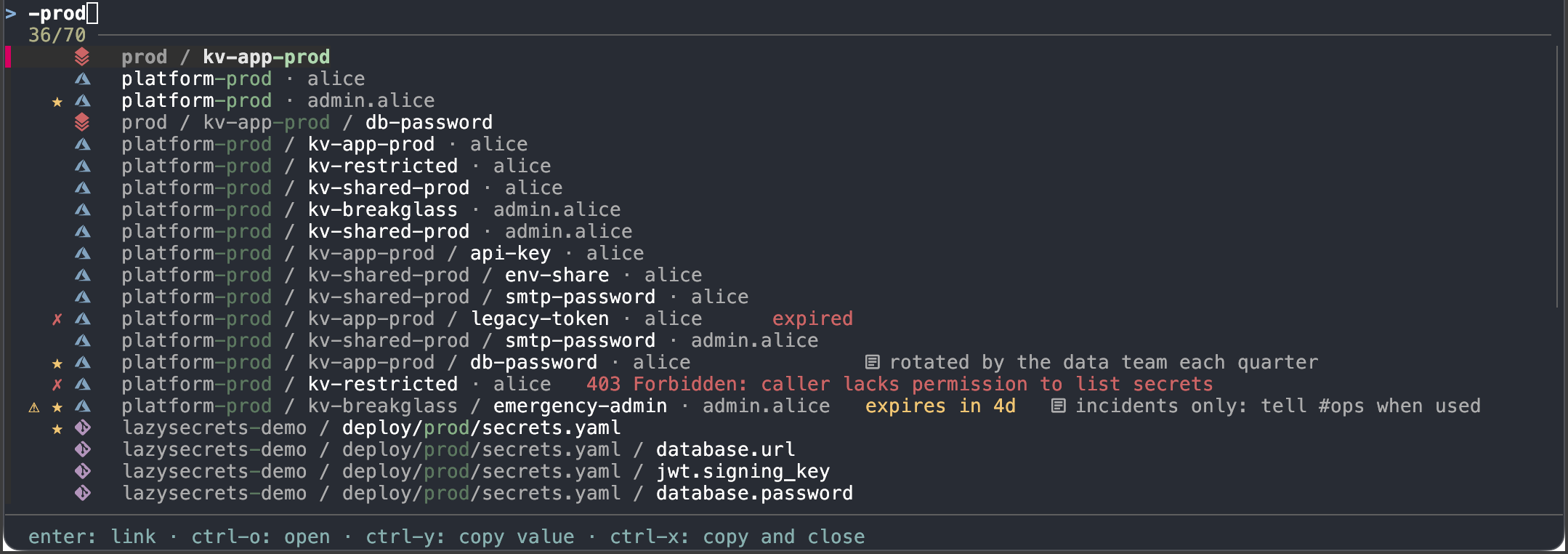
`lazysecrets list` prints every source, vault and secret, one per line,
tab-separated:
| Field | |
|---|---|
| kind | `source`, `vault`, `secret`, `key` or `certificate` |
| mark | ✗ when something's wrong (expired, or couldn't be read) or ⚠ when it expires soon; ★ when starred; ◷ when used lately (with `--recent`); and the provider's icon |
| name | `platform-prod / kv-app-prod / db-password` |
| status | why a vault or source couldn't be read, or that it has `expired` or `expires in 12d` (within `ui.expiryWarningDays`), or empty |
| note | your note on it (`n` in lazysecrets), after a note icon (✎ without icons), or empty |
| account | what it's listed through: an az account (`Azure:/`), `Databricks` or `Repos` |
| link | its `lazysecrets://` link |
What's cached prints at once, then what loads follows as it arrives: read
it as a stream. Values are never listed. It stops quietly when the reader
goes, like fzf after a pick. Kind stays the first field, and account and
link the last two; new fields only ever go between. The mark has a field of
its own so a search can leave it out: in fzf, `--nth` searches the name,
so `^prod` finds names starting with prod.
| Flag | |
|---|---|
| `--format json` | an object per line instead, for editor plugins (below) |
| `--kind secret,vault` | only these kinds: `source`, `vault`, `secret`, `key`, `certificate`; lists only other kinds need aren't loaded |
| `--cached` | only what's cached, at once: nothing is loaded from Azure or Databricks |
| `--max-age 2m` | load cached lists older than this again |
| `--errors=false` | leave out the vaults and sources it couldn't read |
| `--color never` | no colours, for scripts |
| `--icons=false` | no provider icons |
| `--stars=false` | no ★ before starred names (in `favouriteColor`) |
| `--notes=false` | no note icon before a note |
| `--recent` | ◷ before names used lately, in `mutedColor`; default `ui.recentIcon` |
| `--expiry=false` | no expiry: not in the status, and no ✗ or ⚠ for it |
With `--format json`, each line is an object with these fields; new ones
may be added:
| Field | |
|---|---|
| `link`, `kind`, `account` | as above |
| `error` | why it couldn't be read, only then |
| `provider` | `azure`, `databricks` or `repo` |
| `path` | the names: `["platform-prod", "kv-app-prod", "db-password"]` |
| `accountLabel` | the account's short name, when several az accounts are signed in |
| `starred` | starred for this account |
| `note` | your note on it, if any |
| `reference` | how config refers to a secret: `@Microsoft.KeyVault(SecretUri=…)` or `{{secrets/scope/key}}` (`Y` in lazysecrets) |
| `url` | its web page, in the Azure portal or the Databricks workspace (`o` in lazysecrets) |
| `recent` | used lately, as Recent (`R`) lists: in the last 90 days |
| `lastUsed`, `uses` | when it was last used, and how often; only when `recent`, to sort by |
| `expires` | when a secret, key or certificate expires, if it does (Azure) |
| `enabled` | `false` for a disabled one; only where the provider says (Azure) |
`lazysecrets open --action go --account ` opens one in
lazysecrets without asking what to do or which account, ending in the
secrets list, like Go to.
### Example usage with fzf
```sh
lazysecrets list | fzf --ansi --delimiter='\t' --with-nth='2..-3' --nth='2..' --accept-nth=-1 \
--header 'enter: link · ctrl-o: open · ctrl-y: copy value · ctrl-x: copy and close' \
--bind 'ctrl-o:become(lazysecrets open --action go --account {-2} {-1})' \
--bind 'ctrl-y:execute-silent(lazysecrets get --account {-2} {-1} | pbcopy)+change-header(Copied the value of {3})' \
--bind 'ctrl-x:become(lazysecrets get --account {-2} {-1} | pbcopy)'
```